What the dashboard counts
The Cost of Ownership dashboard sits in Grafana's GarageBooks folder (see step 6 of Setup). Its two links go to the app (Add / edit expenses) and back to TeslaMate's own dashboards.
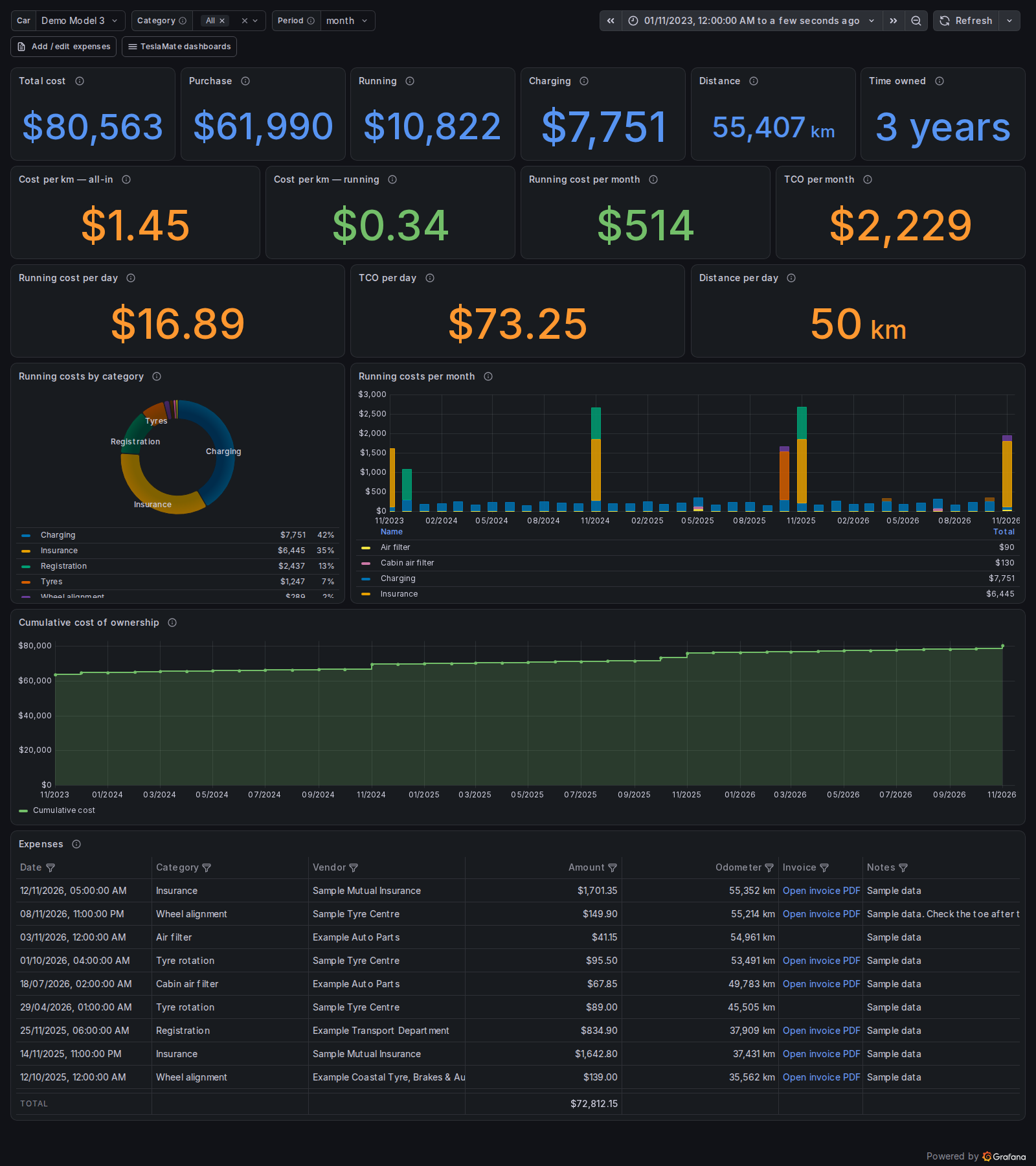
The figures
All of them come from the garagebooks.ownership view (garagebooks/schema.sql), one row per car:
| Figure | Definition |
|---|---|
| Total cost | purchase + running expenses + charging, less the sale price once the car is sold (see Selling a car) |
| Charging | TeslaMate's charging_processes.cost for a car it tracks, plus expenses in a charging or fuel category (Charging, Fuel) |
| Distance | latest odometer (for a sold car, the highest known on or before the sale date) − odometer on the purchase expense (else the lowest odometer known). The odometer is TeslaMate's, or the odometer on an expense (or the final odometer of a sold car) |
| Cost per km — all-in | total cost ÷ distance |
| Cost per km — running | (running + charging) ÷ distance, excludes the purchase price |
| Per day and per month | running (or total) cost, or distance, ÷ the time since purchase, or until the sale date for a sold car (at least one day, or one month) |
With no TeslaMate, the dashboard is written without TeslaMate's parts and counts what you entered. When TeslaMate is there but its figures are held back (an untested version, or tables that can't be read), a note at the top gives the reason, and the totals that need TeslaMate say unavailable for a car it tracks instead of showing a figure with the charging missing. See Without TeslaMate.
The headline panels are all-time. The charts, pie and table follow the dashboard's time range, which starts at your earliest data. Grafana has no "all time", so the app works the start out each time it starts; a back-dated expense older than that needs the range widened by hand.
Selling a car
Record the sale on the Cars page (see Cars). For a sold car:
- Total cost, TCO per month, TCO per day and Cost per km, all-in are net of the sale price: purchase + running + charging − sale price. The sale price comes off only while a purchase category is ticked in the Category box, because it is what you got back of the purchase price. Running-only figures are not affected.
- Time owned and every per-day and per-month figure divide by the time from purchase to the sale date, not to today, so they stop growing once the car has gone.
- Distance stops at the sale: the highest odometer known on or before the sale date, whether TeslaMate's, the odometer on an expense, or the final odometer you entered with the sale. A reading or drive after the sale is ignored.
- The Sold tile reads Sold 12 Mar 2026 · $31,000. It is on the dashboard only once a car has been sold. The Car box adds (sold) after the car's name.
- Charging or expenses dated after the sale still count: they are real costs.
Running costs per FBT year
Below the cumulative chart, bars show running costs for each FBT year (1 April to 31 March), labelled like
FBT 2025–26 and stacked by category, with charging from TeslaMate included where there is a TeslaMate.
The year comes from each expense's date in the dashboard's time zone, so nothing is picked and it follows
the time range: a year cut off by the range shows only the part inside it. The purchase price is left
out. The same rule is in the database as garagebooks.fbt_year(date) (the year a date's FBT year starts
in), for queries of your own. The per-car report is described under Leases.
Cost after tax
Two panels in a row below the others show what the running costs come to after tax, beside the invoices. They are on the dashboard only once a marginal tax rate is entered in Settings and some car has a lease; saving either rewrites the dashboard, so they appear and go by themselves. An expense paid from the package has its GST claimed back and the rest comes from pre-tax salary; one paid personally costs its invoice. The rules, the simplifications and a worked example are on Novated lease calculations. It is not tax advice.
- Running costs after tax gives, for the selected car, the running and charging costs on the invoices and what they cost after tax, all-time and following the Category box. TeslaMate's charging, where there is a TeslaMate, counts as paid personally. It shows a dash while a packaged expense can't be worked out.
- After tax by FBT year lists each FBT year with the same two figures and the difference. It ignores the time range, so the years are whole.
The home charging reimbursement needs the odometer, so it is shown in the app only (on the FBT year report), not on the dashboard. The existing total cost of ownership figures are unchanged: these panels sit beside them.
Reminders
The Reminders table, above the expenses, lists what is open for the selected car, most urgent first: the title, due date and due odometer reading, Days left, Km left and Status (Overdue, Due soon, Upcoming, Odometer unknown, or Provider renews for a registration the lease provider looks after). The rules are the same as in the app: see Reminders. It needs no TeslaMate table, so it is there with or without TeslaMate. The odometer it counts from is the car's latest known one (the same as Distance above). With none known, a reminder due by odometer says Odometer unknown and its Km left is empty. A reminder due today or later is Due soon inside its lead time; the days left count from today in the dashboard's time zone. It shows open reminders only, whatever the time range, and includes the registration and lease end from the car's lease.
Kilometre pace
The Kilometre pace table, at the bottom of the dashboard, shows the selected car's current lease against its estimated km per year, for the current FBT year: Expected km (pro rata for the days held), Odometer at start and Odometer needed at end, Km per day needed, Driven so far, Km per day driven, Ahead (+) or behind (-) the pro-rata pace and Km per day needed from today. They are the same figures as the FBT year report works out. The table is empty for a car with no current lease or no estimate, and the panel is left out of the dashboard altogether until a lease has an estimate. A figure that needs an odometer that isn't known is empty, not 0.
The odometer comes from the database function garagebooks.odometer_at(car, moment): TeslaMate's last position at or before
the moment for a car it tracks, else your latest reading or an expense's odometer. The panel reads none of TeslaMate's tables itself, so it
works with TeslaMate present, absent or held back (when its figures are held back, only the readings you entered are used).
Rebates and refunds
A rebate or refund (a state EV rebate, an insurance refund for ending a policy early) is an expense
with a negative amount, such as -3000. It lowers the category's total and everything built on it,
so the cost figures are net of what you got back. The pie can't show a negative slice, so a category
whose total ends up below zero is left out of it.
The boxes at the top
- Car picks the car.
- Category limits the headline cost figures (totals, per km, per day, per month) to the categories you pick. Charging counts as a category of its own. Distance and Time owned (shown as years and months) are not affected, and neither are the charts, pie and table.
- Period groups the running-cost bars and the cumulative chart by week, month or year.
Colours and number formats
Charging and each starter category keep the same fixed, clearly different colour in the pie and the bars (a colour-blind-safe set). Categories you add yourself take Grafana's default colours; to pin one, add a colour override for that series name in the panel.
Currency is in dollars and distance in km. Digits are grouped, and the decimal mark chosen, by the
browser's language, so $1,362.00 for English (Australia) and $1.362,00 for German. Decimals are
fixed, so $1.30 a day keeps its zero.