Setup
No login of its own
The app has no login of its own. Only publish it behind a forward-auth gate, such as
Authentik or Authelia with Traefik, or Cloudflare Access in front of a Cloudflare Tunnel (a worked
example is in Publishing with Traefik and Cloudflare).
docker-compose.traefik.yml refuses to start without a gate.
-
Configure.
cp .env.example .env. SetDATABASE_USERandDATABASE_PASSto the same values TeslaMate and its other add-ons use (they're in TeslaMate's compose file), andFQDN_TMto the same value as TeslaMate's compose variable.FQDN_TMis read on first start only (step 7), so set it now. SetAPP_TZto your IANA timezone. For OneDrive, add the key from OneDrive uploads now too, or later with a restart. To keep invoices in a folder on this server instead, see Invoice folder on the server. -
Back up TeslaMate's database. The first start adds the
garagebooksschema to it and changes nothing else, but take a backup first, as for any upgrade that touches the database. What to back up, and how to check that your backup includes the app's schema, is in Backup and restore. -
Run it. Set
GARAGEBOOKS_IMAGEto a released image, or leave it unset to build locally. Follow a release channel with:rcor:latest, or pin one version (see RELEASING.md).docker compose up -d # localhost:8088/garagebooks/ docker compose -f docker-compose.yml -f docker-compose.traefik.yml up -d # behind Traefik and forward-authIt joins TeslaMate's compose network (
TESLAMATE_NETWORK, defaultteslamate_default). The app creates its schema by itself; see The database. -
Check it started. The first start logs
schema created, thenstarted: ... onedrive=on(oroffwithout the key) andinvoice_folder=off(oronwith a mounted invoice folder):docker compose logs garagebooks | grep -E 'schema|started'Behind forward-auth, open the address in a private window: it must send you to the login page.
-
Somewhere for invoices (optional). See OneDrive uploads or Invoice folder on the server. Without either, an expense can still carry a link you paste.
-
Grafana. Each time it starts, the app writes its own dashboard to the
garagebooks-dashboardsvolume, so the dashboard always matches the version you run. Its timezone is yourAPP_TZ(there's no timezone box on the dashboard; it's set in the compose file, as in TeslaMate). Give TeslaMate's Grafana that volume andgrafana/provider.yml, in TeslaMate's compose file:services: grafana: volumes: - garagebooks-dashboards:/dashboards-garagebooks:ro - /path/to/garagebooks/grafana/provider.yml:/etc/grafana/provisioning/dashboards/garagebooks.yml:ro volumes: garagebooks-dashboards: external: true # created when you start this app's compose fileThen recreate Grafana from TeslaMate's compose folder (a plain restart doesn't add new volumes):
docker compose up -d grafanaThe dashboard appears under GarageBooks (datasource
TeslaMate, tested on Grafana 13); What the dashboard counts explains it.Provisioned dashboards can't be edited in Grafana. To customise it, import
grafana/cost-of-ownership.jsonby hand instead (Dashboards → New → Import), set thetzvariable to your IANA zone (Dashboard settings → Variables) and save, then setDASHBOARD_DIR=empty in.envso the app stops writing its own copy. -
Check the links. On first start the app uses
FQDN_TMto pre-fill its Settings page (the same idea as TeslaMate's): this app athttps://$FQDN_TM$BASE_PATH/and the dashboard athttps://$FQDN_TM/grafana/d/garagebooks-tco(change the/grafanapart withGRAFANA_PATH). Those addresses add a Dashboards ↗ link to the app's header and make the dashboard's Add / edit expenses link go to the right place. After that, the Settings page is the only place to change them, and restarts never overwrite it. WithoutFQDN_TMthey start empty, and you fill them in there.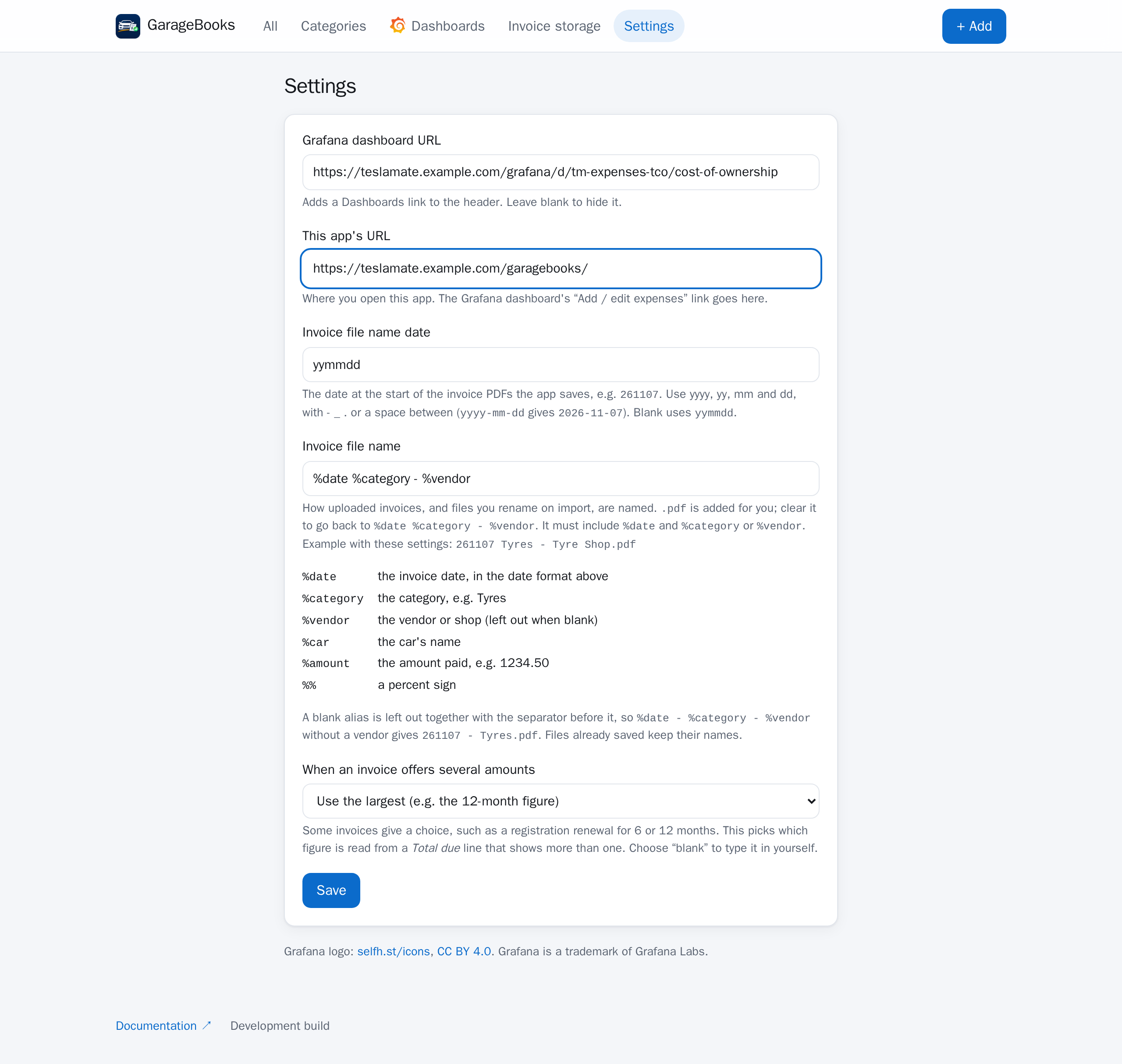
Scheduled jobs
Nothing to do: the app looks at TeslaMate again every hour and rewrites its dashboard every six hours, in the background. To run them in a container of their own instead, see Scheduled jobs.
The database
There is nothing to run. On start the app creates its own garagebooks schema in the TeslaMate
database (idempotent, so upgrades apply themselves), and only ever writes inside it. It reads
cars, positions and charging_processes, and the version table schema_migrations, and holds
TeslaMate's figures back on a TeslaMate newer than the one it was tested with (see
Reference). TeslaMate's cars appear on the app's Cars page by
themselves; a car TeslaMate doesn't track is added there by hand (see
Without TeslaMate). This needs TeslaMate's database user, which
owns the database; Grafana already reads it the same way.
To give the app less than that, run scripts/provision-db.sh once. It creates a role that
can write expenses and read only cars, schema_migrations, positions(car_id, date, odometer) and
charging_processes(car_id, start_date, cost). Point
DATABASE_USER/DATABASE_PASS at it and set SKIP_MIGRATE=1. Re-run the script on upgrades (the scheduled jobs' table needs it).